
Appearance
Image transformations
While we store high-quality copies of images on S3, we need to serve optimized image versions to end users. There are a lot of ways to do it, at some point we deiced to use ImageKit that does few things:
- based on browser version, serves the best file format (usually AVIF)
- allow transforming images on the fly (and store result on CDN)
ImageKit Integration
For images that are stored on S3 buckets, we have Imagekit.io integration (means image transformations and Format Auto-Selection doesn't work with Vite/git repo images). ImageKit operates atop the AWS CloudFront CDN and provides optimization and transformation capabilities.
Example transformations (using our custom helper functions):
php
// Resize and auto-focus
img_transform($masterclass->hero_picture_path, ['w' => 464, 'h' => 464, 'fo' => 'auto']);
// path/image.jpg?tr=w-464,h-464,fo-auto

public_img_url($masterclass->hero_picture_path, ['w' => 464, 'h' => 464, 'fo' => 'auto']);
// https://public-images.interaction-design.org/path/image.jpg?tr=w-464,h-464,fo-auto
TIP
Different devices may use different DPR (Device Pixel Ratio).
Examples:
- MacBook Pro 2022: 2x
- iPhone 12: 3x
Luckily, you don't need to worry about optimizing images for different devices based on DPR, as ImageKit handles it for you. For example, on a device with a 2x DPR, ImageKit will automatically serve an image that's twice the size (928 x 928 px instead of 464 x 464 px). If you're interested in the technical details, please see the Ask HTTP clients to provide DPR (Device Pixel Ratio) pull request.
ImageKit works with s3-images and s3-deprecated sources using different CDNs:
- https://public-images.interaction-design.org/{filenamepath} for
s3-imagesdisk - https://public-media.interaction-design.org/{filenamepath} for
s3-deprecateddisk
Plans to support ImageKit for Vite images
While it's still not implemented, it's possible to do in 2 ways:
- Use URLs like https://ik.imagekit.io/fsagsz7h3vl/vite/{filename} (not recommended as it's another domain and HTTP clients need to make another DNS and TSL requests; basic integration)
- As a deployment step, upload Vite images to
s3-imagesand thus use them as regulars3-imagesimages (viapublic_img_url()if transformations are needed) plus updateASSET_URLto usepublic-images(not implemented yet, but it's a good idea; the downside is that the bucket will not contain not images also, but the name is misleading)
How ImageKit works
On a high level, this is how the request flow looks like: 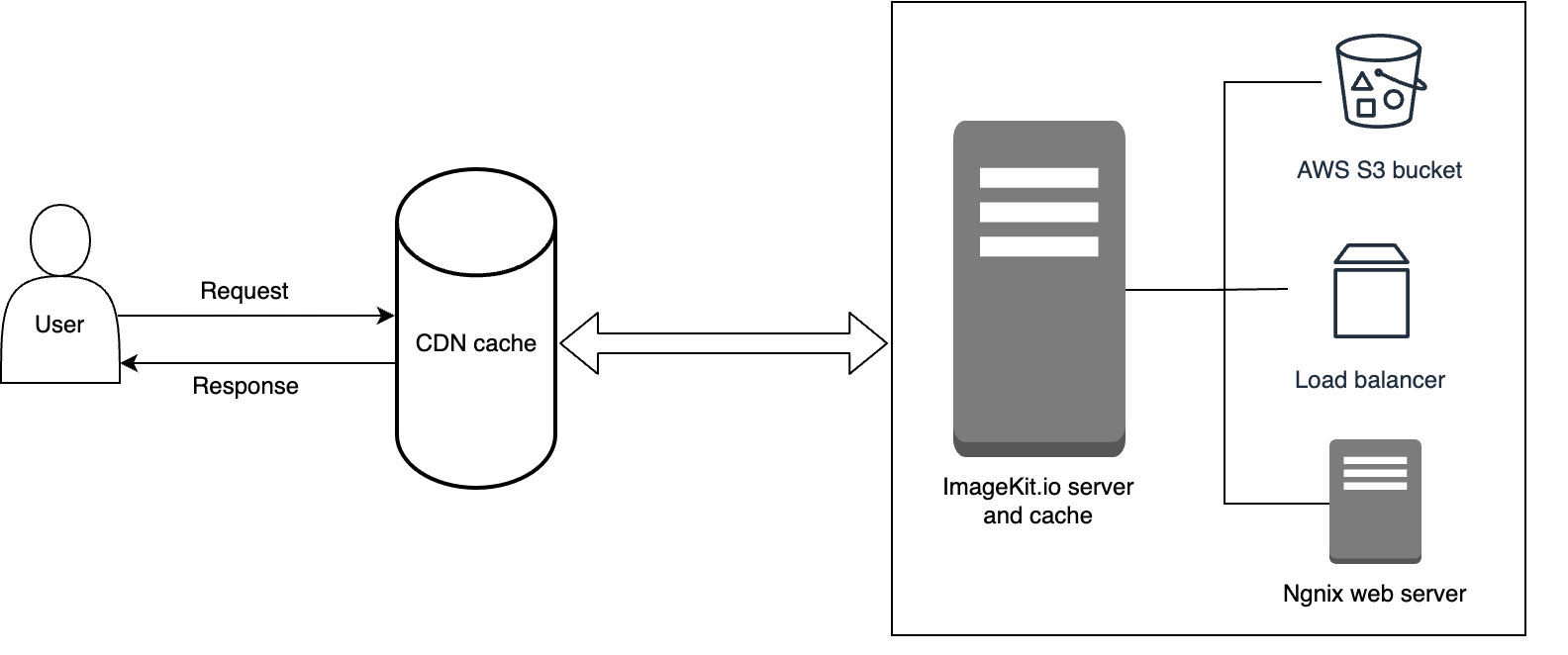
- Browser Requests an Image via Custom Domain
- The browser makes a request to an image from
public-images.interaction-design.org(this domain is added by thepublic_img_url()). - This domain has a CNAME DNS record pointing to
fsagsz7h3vl.imgkit.net, routing requests to ImageKit server.
- The browser makes a request to an image from
- ImageKit Processes the Request
- Cache Check: ImageKit checks if the optimized or transformed image exists in its CDN cache.
- Cache Miss:
- ImageKit fetches the original image from the configured origin (either your S3 bucket or a CDN like CloudFront).
- Applies the necessary optimizations and transformations.
- Caches the transformed image on its CDN edge servers.
- ImageKit Serves the Optimized Image
- The optimized image is delivered to the browser from ImageKit's CDN, ensuring fast and efficient delivery.
When you set up ImageKit, you need to provide:
- S3 bucket name and provider (Amazon S3, DigitalOcean Spaces, etc.)
- S3 keys: access and secret
ImageKit uses their own CDNs based on Amazon CloudFlare; that's why you will not see these CDNs on our Amazon AWS account.
Format Auto-Selection
ImageKit automatically converts images to modern formats if supported by the browser:
- AVIF (highest priority)
- WebP (fallback)
- Original format (the lowest priority)
Selection is based on the Accept header:
text
'Accept' => 'image/avif,image/webp,image/apng,image/svg+xml,image/*,*/*;q=0.8',Note: The file extension remains unchanged (e.g., image.jpg might be served as AVIF). Check the Content-Type response header for the actual format. See \Tests\Feature\Modules\Media\Http\Controllers\ImageKitFormatTest for implementation details.