
Appearance
CI/CD pipelines
Here is a simplified version of our deployment pipeline:
Steps (overview)
- Trigger events to run CI/CD scripts
- CI (test pipelines)
- Running tests
- Check code-style and other non-deployment blocking stuff
- CD (deployment pipelines)
- Check deployment conditions
- Auto-Deploy
- After deployment: Notify team
Trigger events to run CI/CD scripts
The only one trigger event to run CI/CD scripts is a git push to InteractionDesignFoundation/IxDF-web repository (merge commit, new direct commit to the main branch or a new git tag).
If you want to make CI service ignoring your push (don’t run CI/CD scripts), please add [skip ci] to your commit message (more about commit messages).
If [skip ci] is not specified in your commit message, CI server will run CI scripts (and probably CD script, see the Auto-Deploy section).
CI
There are 2 types of pipelines on CI:
- deployment blocking: when it fails, the release will not be deployed (tests + important checks)
- deployment-independent (linters, code-quality checks, etc)
CD
Auto-Deploy
Deployer
To run deployments, we use Deployer — a deployment tool written in PHP with support for popular frameworks out of the box. The main features we use:
- Seamless deployments (create a new app and switch a symlink)
- Ability to rollback a deployment (switch a symlink back and run
migration:rollback) - Custom tasks (written in PHP)
- Ability to run any task on a remote server (using SSH) or on your local machine.
You can find deployer config in our repository: deploy.php. Here you can find a list of all our hosts/stages and the main deploy task.
This tool is very powerful and flexible, you can run different tasks on remote servers (it uses SSH under the scene), but normally you shouldn’t use it directly.
Deployer’s deploy task
Here is a code for the task: task('deploy', [...])
Long story short:
- It clones a git repo version into a new directory
- it installs all dependencies prepares all assets
- it does some application optimisations
- it changes a symlink, so new code will work instead of old one
- it restarts all ling-living PHP processes, so they can use a new code all
We have missed DB migration process in this list, because we do it pretty rare. What you should know about DB migrations it that it’s a blocking process (so far), so application will be in maintenance mode and will not be accessible to end-users (that means DB migrations should be optimized and back end developers should use background jobs instead if it’s possible).
This is how directory structure usually looks on our servers:
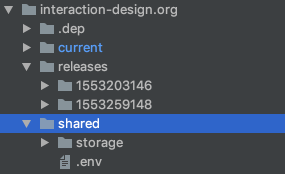
Where current is a symlink to the latest release directory. We also keep previous release, so we can easily rollback in case of problems.
After deployment
After a successful deployment, deployer runs some commands to notify some services about a new deployment.
Examples of such services (for deployments to production):
- New Relic changes
- Slack (
#releaseschannel)
Released your changed? – We recommencement you to go through After deployment checklist.