
Appearance
Credentials Overhaul
Is there a suspicious activity on the platform? A hacking attempt maybe? Someone we don’t trust gained access to our password manager? This list is a small reminder for platforms that we have credentials for -- in case you need to update them.
Types of an overhaul
- Partial overhaul
- Complete overhaul
- Complete EMERGENCY overhaul
Type 1: Partial overhaul
If you notice suspicious activity, you may not need to overhaul all the credentials. Please pick the ones to change based on the case.
Type 2: complete overhaul
This is something we should do every 6 months (or so) or in the event that we have experienced a more serious hacking attempt. We simply go through each and every one of the passwords and API keys and change each one of them. Remember... every time you change a password; please insert an emoji at the very start of the entry, possibly replacing the emoji that's already there from the last time we did a "complete overhaul."
Type 3: Complete emergency overhaul
This is something we do in emergencies, like suspected hacking or other extreme situations. Better safe than sorry!
See further down for the "EMERGENCY PROTOCOL/METHOD"!
Actions
Change passwords, keys, etc that are available in LastPass
Method: This is how we should do it - for each entry in LastPass
Please follow this method for each password you want to change:
- Locate the entry for the given service/website/key/etc. in LastPass that you want to change.
- Make sure you have admin rights to the "Shared folder" within which this entry is shared
- Insert the following text at the END of the "notes" field for the entry (in case there is text already inside the "notes" field): "Password changed on <date>, <year> by <your name>".
- If, AND ONLY IF, this is part of a "complete overhaul" or "emergency overhaul", then please insert an emoji (which you have agreed upon with the rest of the organization) at the very start of the entry, possibly replacing the emoji that was already there from the last time we did a "complete overhaul" or "emergency overhaul". It is crucial that you use a Unicode character and do not simply paste a random emoji from Slack.
- Then click save—although you have not yet changed the password. This is just to guard against the scenario where someone else starts to change a password that you are in the process of changing.
- Go through the relevant flows for the given service/website/etc, and change the password/key/etc. Then update the LastPass entry with the new password/key/etc, and verify that everything is correctly inserted and updated.
- Move on to the next entry on your list and do the same procedure.
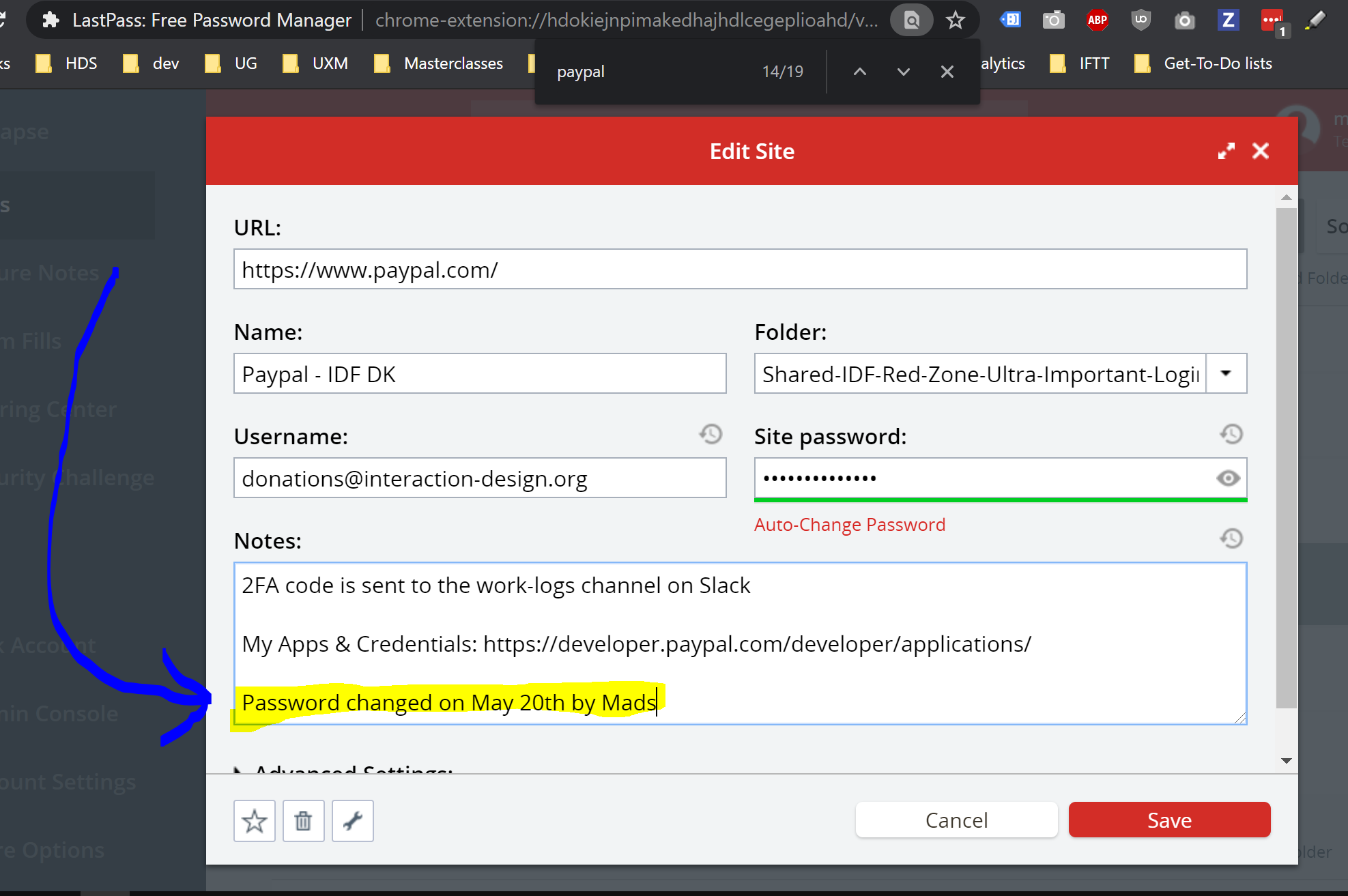
Developers specific credentials
Developers, don’t forget All the following:
- Sudo passwords for all servers
- SSH users on all servers. [Write more verbosely what to check.... do we we change anything??]
- [list all servers here so we have them]
- [list all servers here so we have them]
- DB password
- API credentials for 3rd party services
- Login credentials for development related sites
- Unwanted accounts on team profiles (on, e.g., DigitalOcean, Laravel Forge, Google, etc.)
- [Write more verbosely what to check.... do we we change anything??]
"COMPLETE OVERHAUL PROTOCOL/METHOD"
To initiate the "COMPLETE OVERHAUL PROTOCOL/METHOD", please post the following on the General Slack channel!
Slack message to post
text
Dear @channel
It is time for a so-called "complete overhaul" of our passwords, as described on https://github.com/InteractionDesignFoundation/IxDF-web/blob/main/docs/workflows/credentials-overhaul.md
This is something we do every 6-12 months.
We will need the @dev-team and @finance-team and @growth-team and @member-experience-team to do a **complete** change of all passwords.
Please start to change the passwords **after** you have read this message completely AS WELL AS read the updated file at https://github.com/InteractionDesignFoundation/IxDF-web/blob/main/docs/workflows/credentials-overhaul.md
After you've done that, please start updating all passwords.
It’s important you read the above-mentioned MD file on github FIRST because there are exact instructions in that file. For example:
1. It’s important that you – every time you change a password – add a line to the “notes” field in LastPass: “Password changed on [today’s date] by [your name]”.
2. When doing this complete emergency overhaul of passwords, then please also change the emoji for each entry to something else (that we agree on). That way, we can - at a glance - see which passwords have been changed. Please agree on which emoji to use as a reply to this message.
Here is an example of how we use emojis in the LastPass entries to quickly spot if a password has been recently changed (see screenshot)
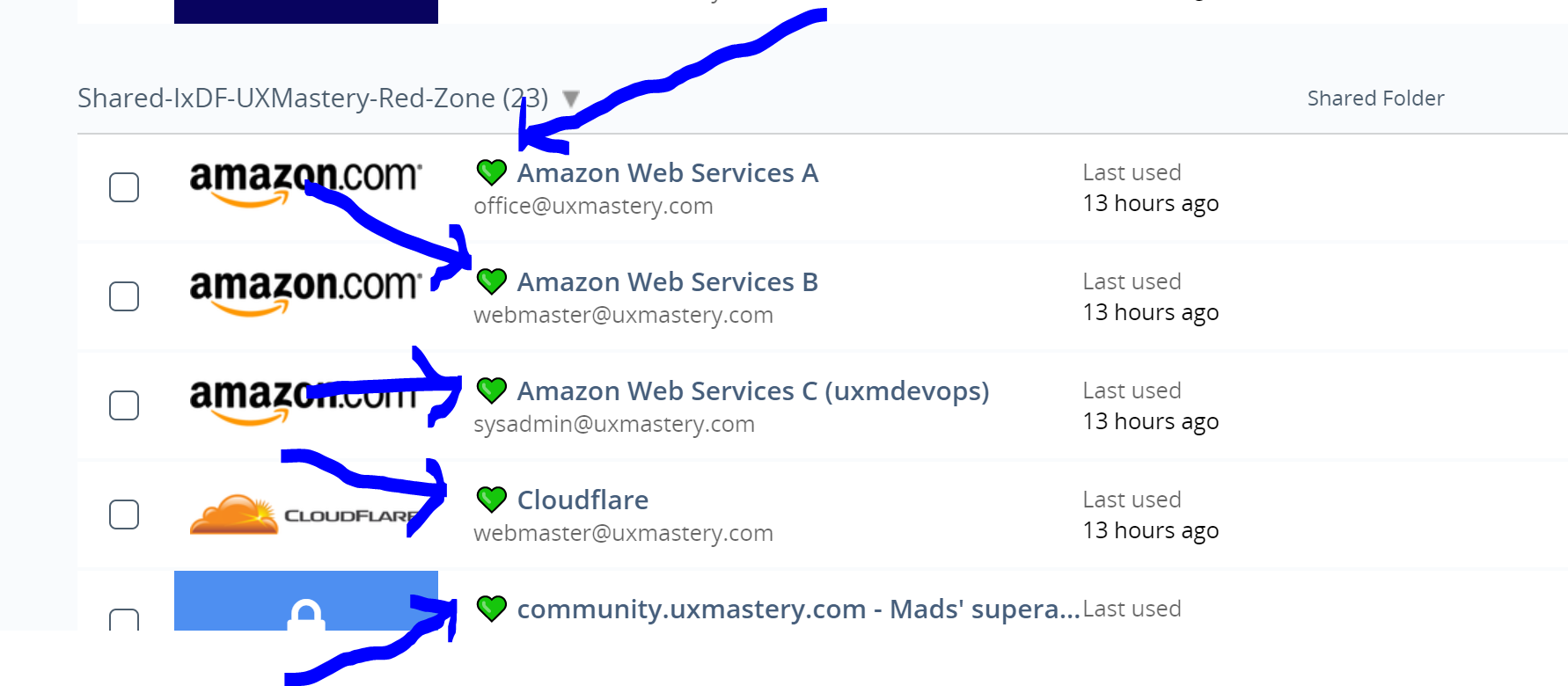
Important: For every service where there are “one time backup codes”, then we need to generate new ones, and also make sure that the old ones cannot be used. This is important since a cache with some one-time-login codes can be used forever. So we need to "renew" them.
As for the choice of icons: Remember to use **Unicode characters only**. The first one who reads this message should post a heart in the color of their choice as a reply to this message. Take your pick! ;-) ❤️ 💙 💚 💛
Thank you for your help!"EMERGENCY PROTOCOL/METHOD"
To initiate the "EMERGENCY PROTOCOL/METHOD", please post the following on the General Slack channel!
Slack message to post
text
@channel
This is an emergency, and I need your help urgently. Please put everything aside.
Please start to change the passwords **after** you have read this message completely AS WELL AS read the updated file at https://github.com/InteractionDesignFoundation/IxDF-web/blob/main/docs/workflows/credentials-overhaul.md
After you've done that, please start updating all passwords.
It’s important you read the above-mentioned MD file on github FIRST because there are exact instructions in that file. For example:
1. It’s important that you – every time you change a password – add a line to the “notes” field in LastPass: “Password changed on [today’s date] by [your name]”.
2. When doing this complete emergency overhaul of passwords, then please also change the emoji for each entry to something else (that we agree on). That way, we can - at a glance - see which passwords have been changed. Please agree on which emoji to use as a reply to this message.
Here is an example of how we use emojis in the LastPass entries to quickly spot if a password has been recently changed (see screenshot)

Important: For every service where there are “one time backup codes”, then we need to generate new ones, and also make sure that the old ones cannot be used. This is important since a cache with some one-time-login codes can be used forever. So we need to "renew" them.
As for the choice of icons: Let's change between difference colors of the heart emoji. The first one who reads this message should post a heart in the color of their choice as a reply to this message. Take your pick! ;-) ❤️ 💙 💚 💛
Thank you for your help!Offboarding checklist
Has a certain person’s computer been compromised? Or did we hire someone who turned out to be untrustworthy? Then we immediately need to deal with that situation in an appropriate manner.
For developers, we also have a special checklist: Offboarding Checklist for a Teamlead.
For all roles we additionally have a file called IxDF Offboarding - 6. Offboarding Checklist for Admins.docx located in the folder IxDF - Staff - Hiring - Offboarding documents. You can get access by requesting Mads or the Finance-Approver to send an invite to that folder.
When you have access to the file, you can use it to help you in 2 scenarios:
Scenario 1: A team member has been hacked
Scenario 1 is if a team member has been hacked, we need to change the individual passwords of the team member, check the accounts of the team member to see if the hacker has logged in and done something bad in the name of that person, etc, etc.
Scenario 2: We hired an untrustworthy team member
Scenario 2 is the horrible scenario where we have hired someone we can’t trust. That has happened only a few times, luckily.
In this scenario, we need to
- Immediately lock/delete all accounts for that person IMMEDIATELY. There is a COMPLETE guide on how to do this VERY FAST inside
IxDF Offboarding - 6. Offboarding Checklist for Admins.docx. You can get access to this file from Mads or the @finance-approver. - Immediately initiate the "EMERGENCY PROTOCOL/METHOD".
N.B.: Credentials overhauls form under an umbrella of security best practices. Please go through the Handbook lesson about our IxDF's Security Guidelines for Remote Work to ensure you or your team is on top of keeping our systems in tip-top shape.
Finish sessions
In rare cases, when the security risk if very high, you also need to finish sessions for shared accounts on different critical services, that doesn't always ask for 2FA:
- GitHub (ixdf-bot account): https://github.com/settings/sessions
- Laravel Forge (Mads' shared account): https://forge.laravel.com/user-profile/authentication
- Digital Ocean