
Appearance
Server Response Cache
Overview
Rendering a page often requires a lot of server resources: database queries, CPU time, API calls, etc. What if we generate the HTML page once and then serve it to all visitors for a certain period?
The dangerous and challenging part of this idea is to avoid caching any personal data or sensitive information such as:
- visitor's name (this is why we do not cache pages for authenticated visitors (Members, Mentors))
- validation error messages, open dialogs and notifications/alerts (we do not want to confuse next visitors by error message that the first visitor got)
- any unique deals/information that generated for a specific visitor based on cookies, IP, etc. Example: referral program blocks.
When a page has any of this data, the whole should not be cached.
In the current implementation, the cache is unique based on:
- URL
- Some parameters (by default, it is just a
pageparam, but it is configurable) - Country (detected by IP address), unless the
global=1flag is used
But cache can't live forever: we publish new articles, course schedules changed every midnight, our Members create new Discussions, Meetups and LocalGroups, etc. For these reasons, cache for different pages has different TTL (Time To Live). Typical TTL values: 1hour, 1day, 1week, tomorrow, etc. Because of caching, it's possible when we publish a new Article, but guests do not see it for a few hours (because of cache) while our Member see it (because we don't cache pages for Members).
Also, we clean up the cache on every new release/deployment (because we can change anything within a new release).
Cleanup Server Response Cache
There is a button on the main Nova page that will remove the server response cache for all pages:
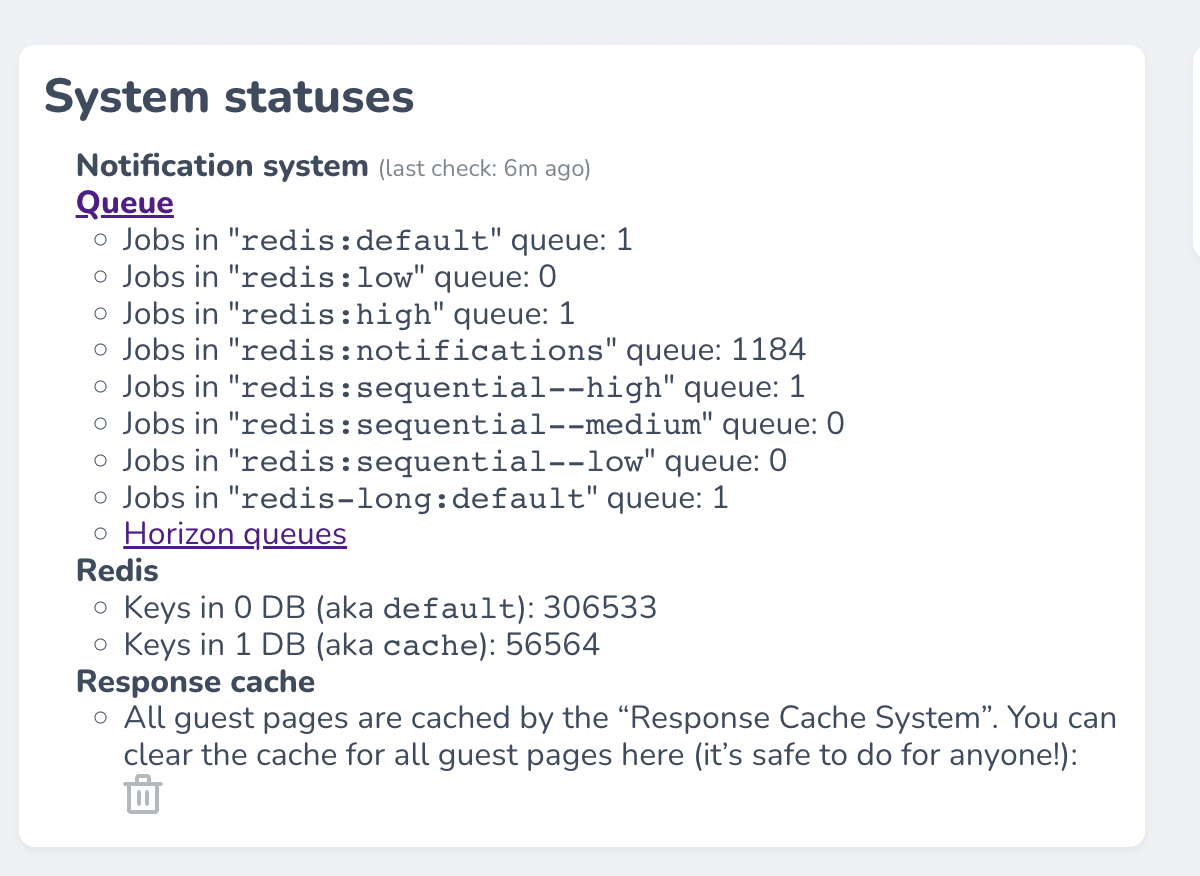
This is a completely safe operation, but it will lead to a slightly slower application response time for the next 5–30mins.
Implementation
It's implemented as route-level middleware and heavily based on https://github.com/spatie/laravel-responsecache package. The main difference is options syntax, as instead of just TTL in seconds, we support more human-readable format like 5mins, 1hour, etc (PHP datetime modifiers).
Cache driver
For a long time we used file driver to offload redis server.
2025-04-28 we faced an issue of not removed cache files: responsecache:clear removed only part of cache on every run. While the issue specific to the file driver (trying to remove locked files or dirs), we can't easily change the driver to Redis: server response cache requires a lot of memory (a lot of author and topic definition pages, geo-based cache, GET query-sensitive cache).
How to use on your route
Example route configuration (home page):
php
use App\Modules\Pages\Http\Controllers\HomePageController;

Route::get('/', HomePageController::class)->name('home')->middleware(['cache.response:ttl=5mins']);
For details, please check InteractionDesignFoundation/laravel-responsecache
Global cache
By default, cache.response middleware creates a country/geo-specific cache to respect different prices and currencies. But some pages are prices and currencies agnostic. For such pages you can add global=1 flag to use a global worldwide cache:
php
use App\Modules\Pages\Http\Controllers\HomePageController;

Route::get('/', HomePageController::class)->name('home')->middleware(['cache.response:ttl=5mins;global=1']);
See Support global server response cache PR for more details.
Sensitive GET params
Unlike the original package, IxDF implementation by default treats all GET params (keys and values) as non-content-sensitive (means the app does not expect them to have an impact on the Response) and thus return the same cache for these examples:
- /blog
- /blog?wid=fh478r
- /blog?wid=fh478r&search=something
This helps to reuse cache even more and offload a server.
There is one exception: page parameters, used for pagination on a lot of pages.
You can also customize a list of such parameters. Example:
php
Route::middleware('cache.response:ttl=monday;query=page&location')
// or the same:
CacheResponse::with(ttl: 'monday', query: ['page', 'location'])
Monitoring
There is ResponseCache Dashboard on NewRelic where you can monitor a cache hit/miss ratio, response time, etc.